Enhanced Support Facility 3.0 - Bundled Software
Overview
Enhanced Support Facility provides improved service performance with additional functions such as a dedicated system monitoring
tool and a utility that can reduce recovery time if the Solaris™ Operating System (Solaris OS) should fail.
This product is bundled with SPARC Enterprise and PRIMEPOWER.
Selling points
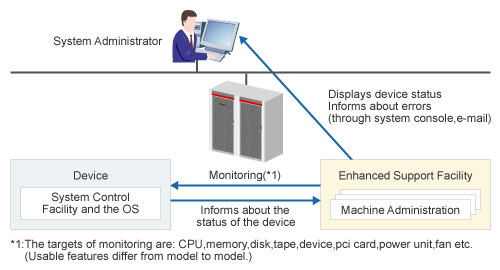
- Enhanced Support Facility analyzes the logs provided by System Control Facility and the OS to notify system administrators of the main unit state precisely. It also provides useful tools for power supply control and maintenance of the main unit. The Enhanced Support Facility enables stable system operation and quick recovery from problems.
Description of features
Enhanced Support Facility provides the functions listed below.
The following abbreviations for each function name are used in this page.
- System Control Facility: SCF
- System Control Facility driver: SCF driver
- eXtended System Control Facility: XSCF
- XSCF Control Package: XCP
- Remote Cabinet Interface: RCI
| Function | SPARC Enterprise T1000/T2000/ T5120/T5220 |
SPARC Enterprise M4000/M5000/ M8000/M9000 |
PRIMEPOWER 250/450/ 650/850/ 900/1500/2500 |
|
|---|---|---|---|---|
| Maintenance, Support | Machine Administration, Remote Support | Some *1 | OK *2 | OK |
| Automatic Power Control System | N/A | OK | OK | |
| System Data Output Tool (fjsnap) | OK | OK | OK | |
| Server Default Configuration | Some *3 | Some *3 | OK | |
| SunVTS/FJVTS (online diagnostic function) |
N/A *4 | N/A *4 | OK | |
| Crash Dump Assistant | OK | OK | OK | |
| Auto Dump Analyze Tool | OK | OK | OK | |
| PRIMEPOWER-DR*5 | N/A | OK | OK *6 | |
| System Parameter Diagnosis | OK | OK | OK | |
| Tape Driver Configuration Tool | OK | OK | OK | |
| Patch Information Collect Command | OK | OK | OK | |
| High reliability | SCF/SCSI Fault LED support option | N/A | OK | N/A |
| SCF driver | N/A | N/A *7 | OK | |
| High-reliability driver *8 | N/A | N/A | OK *8 | |
| XSCF *9 | N/A | N/A *10 | OK *11 | |
| Common functions | Web-Based Admin View/WWW Server for Admin View | N/A *12 | N/A *12 | OK |
*1 Some functions are supported. Refer to the next section “Machine Administration and remote support (REMCS)”.
*2 Some functions are provided by XSCF. Refer to the next section “Machine Administration and remote support (REMCS)”. For
details of XSCF, refer to the "SPARC Enterprise M4000/M5000/M8000/M9000 Servers XSCF User's Guide."
*3 Some functions are supported. And, see the paragraph of Server Default Configuration.
*4 For SunVTS, use the software bundled with the Solaris OS.
*5 The Dynamic Reconfiguration function in Enhanced Support Facility 3.0 remains compatible with that in Enhanced Support
Facility 2.x.
*6 PRIMEPOWER 900/1500(Equipped with SPARC64™ V)/2500 only.
*7 SCF driver is provided by Solaris.
*8 Not required for the unit to which no system console connection unit is connected. Only a PRIMEPOWER 900/1500/2500 unit
is required.
*9 Enhanced Support Facility provides only documents for XSCF.
*10 See "SPARC Enterprise M4000/M5000/M8000/M9000 Servers XSCF User's Guide".
*11 PRIMEPOWER 250/450 only.
*12 For the Web-Based Admin View/WWW Server for Admin View, use the software supplied with your middleware.
Machine Administration and Remote Support (REMCS)
Supported Models:
SPARC Enterprise T1000/T2000/T5120/T5220/M4000/M5000/M8000/M9000 and PRIMEPOWER 250/450/650/850/900/1500/2500
Machine Administration and Remote Support (REMCS) provides the functions listed below.
Functions (Maintenance support)
- Machine Administration sets the hardware environment, monitors the hardware status, and collects information. The hardware configuration view displays the operating status and allows the above functions to be checked. This status can also be displayed as a log.
- Machine Administration monitors the system status from a remote location and analyzes logs to predict hardware failures. For hardware that requires service life management, Machine Administration automatically reports relevant information to the system administrator and support center according to guidelines set by the system administrator. As a result, hardware preventive maintenance is enabled and system reliability improved. Currently, the support center does not support the support center notification function. The commencement of this service will be reported separately.
- Machine Administration provides hardware monitoring and setup; log settings and display, and a machine administration menu that displays maintenance guidance for hot replacement of hardware parts.
- Machine Administration allows you to set the interval required prior to this software automatically shutting down the operating system after a UPS (Uninterruptible Power Supply) detects a power failure.
| No. | Function | SPARC Enterprise T1000/T2000/ T5120/T5220 |
SPARC Enterprise M4000/M5000/ M8000/M9000 |
PRIMEPOWER 250/450/ 650/850 |
PRIMEPOWER 900/1500/ 2500 |
|---|---|---|---|---|---|
| 1 | Displaying hardware configuration | OK | OK | OK | OK *1 |
| 2 | Monitoring battery life | N/A | N/A | OK | OK *2 |
| 3 | Monitoring UPS abnormalities (only UPC connected by UPC Interface) | N/A | OK *3 | OK | OK *2 |
| 4 | Monitoring fan abnormalities and life-cycle | OK *4 | OK *3 | OK | OK *2 |
| 5 | Monitoring Power Supply abnormalities | OK *4 | OK *3 | OK | OK *2 |
| 6 | Monitoring Disk abnormalities | OK | OK | OK | OK |
| 7 | Monitoring Disk preventive replacement | N/A | N/A | OK | OK |
| 8 | Monitoring Memory abnormalities and preventive replacement | OK | OK *3 | OK | OK |
| 9 | Monitoring tape cleaning requests | N/A | N/A | OK | OK |
| 10 | Monitoring Tape Unit abnormalities | OK | OK | OK | OK |
| 11 | Monitoring degradation information | OK *6 | OK *3 | OK | OK *2 |
| 12 | Saving and restoring monitoring information | OK | OK | OK | OK *2 |
| 13 | RCI-related settings | N/A | OK *3 | OK | OK *2 |
| 14 | Displaying message log | OK | OK | OK | OK |
| 15 | Displaying SCF error log | N/A | OK *3 | OK | OK *2 |
| 16 | Displaying power log | N/A | OK *3 | OK | OK *2 |
| 17 | Saving log | OK | OK | OK | OK |
| 18 | Guide to hot replacement of magnetic disks | N/A | OK | OK | OK |
| 19 | Guide to hot replacement of power supply in basic frame | N/A | OK *3 | OK | OK *2 |
| 20 | Guide to hot replacement of power supply in expansion frame | N/A | OK *5 | OK | OK *2 |
| 21 | Update function for disk firmware | N/A | N/A | OK | OK |
| 22 | Calling hardware diagnostic programs | N/A | N/A | OK | OK |
| 23 | REMCS center report | OK | OK *3 | OK | OK *2 |
| 24 | Setting UPS | N/A | OK *3 | OK | OK |
*1 This function is provided by both the server and the System Management Console. See Hardware Guide for the System Management
Console.
*2 This function is only provided by the System Management Console. See Hardware Guide for the System Management Console.
*3 This function is provided by XSCF. For details, refer to the "SPARC Enterprise M4000/M5000/M8000/M9000 Servers XSCF
User's Guide," the "SPARC Enterprise M4000/M5000 Servers User's Manual," and the "SPARC Enterprise M8000/M9000 Servers
User's Manual."
*4 Only the SPARC Enterprise T2000/T5120/T5220 supports this function.
*5 Only the power supply of the expansion cabinet is supported.
*6 Supported by Enhanced Support Facility Manuals & Patches 3.0A20.
Automatic Power Control System (APCS)
Supported Models:
SPARC Enterprise M4000/M5000/M8000/M9000 and PRIMEPOWER 250/450/650/850/900/1500/2500
Automatic Power Control System provides the functions listed below.
Functions (Maintenance support)
- The Automatic Power Control System (APCS) provides the functions listed below to enable automatic system power on/off according to a specified operation schedule.
| No. | Function | SPARC Enterprise T1000/T2000/ T5120/T5220 |
SPARC Enterprise M4000/M5000/ M8000/M9000 |
PRIMEPOWER 250/450/ 650/850 |
PRIMEPOWER 900/1500/2500 |
|---|---|---|---|---|---|
| 1 | Adding, deleting, and displaying schedules | N/A | OK | OK | OK *1 |
| 2 | Starting and stopping schedules | N/A | OK | OK | OK *1 |
| 3 | Setting power recovery mode | N/A | OK | OK | OK *2 |
| 4 | Operation management view using Web-Based Admin View | N/A | N/A *3 | N/A *3 | OK *4 |
*1 This function is only provided by the System Management Console. See Hardware Guide for the System Management Console.
*2 Power recovery mode can be displayed or set only for a partition. You must operate this partition by partition.
*3 Your operation can be done through menus in the character user interface.
*4 You can operate this using the Machine Administration menu of the System Management Console. See Hardware Guide for the
System Management Console.
System Data Output Tool (fjsnap)
Supported Models:
SPARC Enterprise T1000/T2000/T5120/T5220/M4000/M5000/M8000/M9000 and PRIMEPOWER 250/450/650/850/900/1500/2500
System Data Output Tool (fjsnap) provides the functions listed below.
Functions (Maintenance support)
- The System Data Output Tool (fjsnap) collects command execution result data and files about hardware and software configurations,
environment settings, logs, and operational status. It then outputs all to a tape unit, etc (approx. 200 types, and 2,000
files).
This tool only executes commands for copying and referencing files and uses the /var/tmp file system as a work area (can be changed).
The collected data is raw except that it is compressed, and its contents can be analyzed using the existing commands for each type of information.
Server Default Configuration
Supported Models:
SPARC Enterprise T1000/T2000/T5120/T5220/M4000/M5000/M8000/M9000 and PRIMEPOWER 250/450/650/850/900/1500/2500
The Server Default Configuration provides the functions listed below.
Functions (Maintenance support)
- Delete the following system logs periodically to prevent disk resource shortages (Solaris 8 OS, Solaris 9 OS):

- /var/adm/messages
- /var/log/syslog
- /var/adm/wtmp (*)
- /var/adm/wtmpx (*)
- /var/adm/vold.log
- /var/adm/sulog
- /var/cron/log
- /var/saf/_log
- /var/saf/zsmon/log
- /var/adm/spellhist
- /var/lp/logs/requests
- /var/lp/logs/lpsched
* Excluded if Solaris OS system accounting is used.
- The information items listed below are collected when a kernel or driver-related problem occurs. This improves system maintainability.
Information collected by this function is recorded in a file collected with the crash dump and the System Data Output Tool
(fjsnap). (SPARC Enterprise and PRIMEPOWER)

- Tracking KMA
Detects incorrect use of dynamic memory within the kernel - KMA Failure Log
A log created when dynamic memory acquisition within the kernel fails - Internal TCP/IP Trace
Collects send/receive packet information by connections - Event Trace
A log for kernel operations, traps, interrupts, etc.
- Tracking KMA
- The following function is provided in PRIMEPOWER 250/450/650/850/900/1500/2500. When the system hangs up, the function to generate crash dump by causing the system panic forcibly is provided. In PRIMEPOWER 900/1500/2500, the crash dump can be generated in each partition. Note: On SPARC Enterprise T1000/T2000/T5120/T5220/M4000/M5000/M8000/M9000, the same function is provided by Solaris OS and the firmware.
- The following function is provided in PRIMEPOWER 250/450/650/850/900/1500/2500. Intermittent single-bit errors in memory are monitored and messages are output into the syslog in the case failure detection. In addition, on SPARC64™GP based PRIMEPOWER 650/850/1500, the same errors in CPU cache can also be monitored.
SunVTS (Sun Validation and Test Suite), FJVTS (Fujitsu/PFU Validation and Test Suite)
Supported Models:
PRIMEPOWER 250/450/650/850/900/1500/2500
SunVTS/FJVTS provides the functions listed below.
Functions (Maintenance support)
- SunVTS/FJVTS, an online diagnostic function, checks settings and functions of controllers and devices and provides the following
functions:
FJVTS covers the diagnosis of Fujitsu hardware (e.g., PCI cards), including SunVTS plus support of Fujitsu-specific systems (e.g., Multipath Disk Control) and provides better disk test.
- Diagnosis results are displayed using a menu. Error locations are posted using a menu and messages.
- Tests can be executed in the following two modes: Functional Test mode:
Functional Test mode
- Provides rich test functions by using all system resources required for test execution. This mode needs a prerequisite that no other application is being executed.
Connection Test mode
- Executes low-load tests that check usability and connection of devices.
- User interface
SunVTS/FJVTS can be executed through the following interfaces:
- Character user interface
Testing can be conducted from the TTY terminal menu.
Tests can also be run from the machine administration menu. - Graphical user interface
Select either the common desktop environment (CDE) or Open
Windows desktop. Tests can be run from the desktop menus.
Machine Administration can also be performed from the menu.
- Character user interface
Notes:
On SPARC Enterprise T1000/T2000/T5120/T5220/ M4000/M5000/M8000/M9000, please use SunVTS bundled with Solaris.
Solaris 8 OS requires a combination of SunVTS 4.0 + FJVTS 4.0, Solaris 9 OS requires a combination of SunVTS 5.1 + FJVTS 5.1, and Solaris 10 OS requires a combination of SunVTS 5.1 + FJVTS 5.1.
Crash Dump Assistant
Supported Models:
SPARC Enterprise T1000/T2000/T5120/T5220/M4000/M5000/M8000/M9000 and PRIMEPOWER 250/450/650/850/900/1500/2500.
Crash Dump Assistant provides the functions listed below.
Functions (Maintenance support)
- When rebooting after a system crash, the system information required for troubleshooting is collected using the System Data Output Tool (fjsnap) when the crash dump is saved.
Auto Dump Analyze Tool
Supported Models:
SPARC Enterprise T1000/T2000/T5120/T5220/M4000/M5000/M8000/M9000 and PRIMEPOWER 250/450/650/850/900/1500/2500.
Auto Dump Analyze Tool provides the functions listed below.
Functions (Maintenance support)
- Core File Collection Tool: cocore
cocore gathers the files (libraries, etc.) required for analysis of the core file for each process, and it creates an archive.
For details of cocore, refer to /opt/FJSVana/doc/README.cocore(ja). - Automatic Crash Dump Analysis Tool (Only for the Solaris 8 OS)
This tool automatically analyzes a crash dump at the time of a reboot following a system crash.
PRIMEPOWER-DR(Dynamic Reconfiguration)
Supported Models:
SPARC Enterprise M4000/M5000/M8000/M9000 and PRIMEPOWER 900/1500(SPARC64™ V installed model)/2500
PRIMEPOWER-DR provides the functions listed below.
Functions (Maintenance support)
The Dynamic Reconfiguration function provides various DR functions according to the model being used.
The following Dynamic Reconfiguration functions are provided in SPARC Enterprise servers.
- XSCF-DR:
The Dynamic Reconfiguration function provided for eXtended System Control Facility.
- PRIMEPOWER-DR:
The Dynamic Reconfiguration function provided for Enhanced Support Facility.
The following Dynamic Reconfiguration functions are provided in PRIMEPOWER 900/1500/2500.
- PRIMEPOWER-DR:
The Dynamic Reconfiguration function provided for Enhanced Support Facility.
This section explains Dynamic Reconfiguration function that Enhanced Support Facility provides (PRIMEPOWER-DR).
Dynamic Reconfiguration allows the user to physically remove, insert or repartition system boards while the operating system is still running. The user can modify system configuration without shutting down the operating system. Typical usage of Dynamic Reconfiguration is:
- Removal of system boards with faulty I/O device/controllers, bad memory or CPU's.
- Temporary detachment of system boards for I/O controller management, addition or removal.
- Addition of new system boards to expand the CPU, memory and I/O capacity of the system.
- Partition reconfiguration - system boards can be grouped into logically independent partitions. The user can reconfigure system partitions dynamically based on demand.
System Parameter Diagnosis
Supported Models:
SPARC Enterprise T1000/T2000/T5120/T5220/M4000/M5000/M8000/M9000 and PRIMEPOWER 250/450/650/850/900/1500/2500
System Parameter Diagnosis provides the functions listed below.
Functions (Maintenance support)
- System Parameter Diagnosis detects and reports system settings that have a high incidence of system administrator change and
that disturb normal operation of the Solaris system.

- Name and value of the tunable parameters (/etc/system file) related to System V IPC(only Solaris 8 OS, Solaris 9 OS)
- Size of the crash dump output destination
A system message is output when the diagnosis detects an invalid setting.
Then, some tunable parameters are revised from the latest valid backup data or returned to their default values.
Tape Driver Configuration Tool
Supported Models:
SPARC Enterprise T1000/T2000/T5120/T5220/M4000/M5000/M8000/M9000 and PRIMEPOWER 250/450/650/850/900/1500/2500
Tape Driver Configuration Tool provides the functions listed below.
Functions (Maintenance support)
- The tape driver configuration tool automatically sets the target tape device configuration to /kernel/drv/st.conf.
- The tape driver configuration tool diagnoses the settings of the driver configuration file (/kernel/drv/st.conf).
Patch version collection command (fjcollect) for the Patch Management Tool
Supported Models:
SPARC Enterprise T1000/T2000/T5120/T5220/M4000/M5000/M8000/M9000 and PRIMEPOWER 250/450/650/850/900/1500/2500
The patch version collection command provides the functions listed below.
Functions (Maintenance support)
- The patch version collection command (fjcollect) for the Patch Management Tool collects the patch version numbers required
for analysis of the patches applied to the system, the installed packages, and machines.
This information is used with the Patch Management Tool or UpdateAdvisor (Solaris) to analyze the system.
The Patch Management Tool and UpdateAdvisor (Solaris) increase the efficiency of a series of complicated work in system management, including checking the patch application status, investigating unapplied patches, downloading patches, and applying patches.
To procure the Patch Management Tool, contact a certified service engineer at one of the organizations listed in "Contact information."
SCF/SCSI Fault LED support option
Supported Models:
SPARC Enterprise M4000/M5000/M8000/M9000
SCF/SCSI Fault LED support option provides the functions listed below.
Functions (High reliability)
- The SCF/SCSI Fault LED support option is optional software that supports the command for accessing the RCI interface included in high-end and mid-range SPARC Enterprise Server models and the DISK hot swapping of SCSI DISK provided by Machine Administration.
SCF driver
Supported Models:
PRIMEPOWER 250/450/650/850/900/1500/2500
SCF driver provides the functions listed below.
Functions (High reliability)
- The SCF driver controls the SCF (System Control Facility) of the hardware and provides the following RAS (Reliability, Availability,
and Serviceability) functions required for server system operation:

- Displays system configuration information by commands.
- Executes system-down and power-off control resulting from use of the POWER switch.
- Diagnoses hardware at system startup and displays information on degraded devices by commands when downgraded operation occurs due to a partial system failure.
- Notifies the operator of any power failure in a redundant configuration of power supplies and fans to continue system operation.
- Automatically stops the system to prevent system damage when abnormal fan operation or temperature problems are detected.
- Enables the replacement of internal disk devices during system operation.
- Notifies the system of any abnormalities (power supply, fan, or temperature problems) occurring in expansion disk cabinet units.
- Enables hot replacement of disks in expansion disk cabinet units.
- Connecting an external power control device enables system shutdown by using a shutdown request from the power control/environment monitoring interface (RCI) and control of the operator call signal on the user terminal board interface.
Note:
SCF driver is provided by Solaris for SPARC Enterprise M4000/M5000/M8000/M9000.
High-reliability driver
Supported Models:
PRIMEPOWER 900/1500/2500
High-reliability driver provides the functions listed below.
Functions (High reliability)
- oSupport for automatic shifting of dual console path. This ensures your operation through OS console can continue even when a breakdown of a communication path occurs.
XSCF
Supported Models:
PRIMEPOWER 250/450
XSCF provides the functions listed below.
Functions (High reliability)
- The Enhanced Support Facility provides only the documentation regarding the XSCF firmware of the PRIMEPOWER 250/450.
Web-Based Admin View/WWW Server for Admin View
Supported Models:
PRIMEPOWER 250/450/650/850/900/1500/2500
Web-Based Admin View/WWW Server for Admin View provides the functions listed below.
Functions (Common functions)
- Web-Based Admin View is a WWW Server and communication infrastructure software to use each application which uses Web-Based
Admin View by Web browser in the operation management platform of the Web/Java base by 3-tier architecture.

- Provides top menu for access from a WWW browser.
- Enables user management access from two or more browsers.
- Provides start/stop management for each application using Web-Based Admin View.
- Provides functions to display access logs and operation logs.
- Allows changes to the operating environment.
Available Web browsers
- The available Web browsers are as follows. Java Plug-in is needed when Web-Based Admin View is used. Please refer to "Remarks" for details.
- For PC client

- Netscape Communicator 4.5 to 4.7x, Netscape 7.x
- Microsoft Internet Explorer 5.0, 6.0
- For Solaris OS client

- Netscape Communicator 4.5 to 4.7x, Netscape 7.x
- Mozilla (TM) 1.7 (For Solaris 10 OS.)
Note:
- For the SPARC Enterprise T1000/T2000/T5120/T5220/M4000/M5000/M8000/M9000 series, use the Web-Based Admin View/WWW Server for Admin View supplied with the respective middle wares.
Advantages
This function supports the development of robust systems that can safely operate and maintain the Solaris OS environment.
New functions
| V/L | Additional functions |
|---|---|
| 3.0 | Enhanced Support Facility Manuals & Patches 3.0 A30
Enhanced Support Facility Manuals & Patches 3.0 A20
Enhanced Support Facility Manuals & Patches 3.0 A10
Enhanced Support Facility Information management
SCF/SCSI Fault LED support option
Remote Support
System Data Output Tool
Tape Driver Configuration Tool
License Manager
|
Downloads
Updated
Download the latest version. (Registration Date)
| Manuals & Patches 3.0 A30 | April 30, 2008 |
| Enhanced Support Facility 3.0 | June 15, 2007 |
Operating Environment
Be sure to confirm the operating environment before using this software.
| Operating Environment | |
Server Model
|
System Requirements
|
(*1) Supported models : SPARC Enterprise T1000, T2000, M4000, M5000, M8000, M9000
Product manual
"Enhanced Support Facility 3.0" consists of the following four documents.
"User's Guide" consists of an explanation of common functions and a summary of each function.
- Enhanced Support Facility 3.0 Installation Guide
- Enhanced Support Facility Update Information
- Enhanced Support Facility Security System Building Guide
- Enhanced Support Facility User's Guide
There manuals are available from the page of "Manuals". Please download what you need from the page.
Notes
1. Refer to "SPARC Enterprise Hardware Platform Guide" for the methods of building the whole system including "Enhanced Support Facility 3.0".
- Visit here: "SPARC Enterprise Hardware Platform Guide" to refer to the guide.
2. Please install the Enhanced Support Facility 3.0 by referring to "Chapter 4 Restrictions and Notes" in "Enhanced Support Facility 3.0 Installation Guide".
Download
Before downloading and installing the driver ensure you have read and understood the notes and had necessary information on operating environment.